



Which SUV’s infotainment feels more intuitive for Schaumburg, IL drivers — 2026 Mazda CX-5 or 2026 Toyota RAV4?
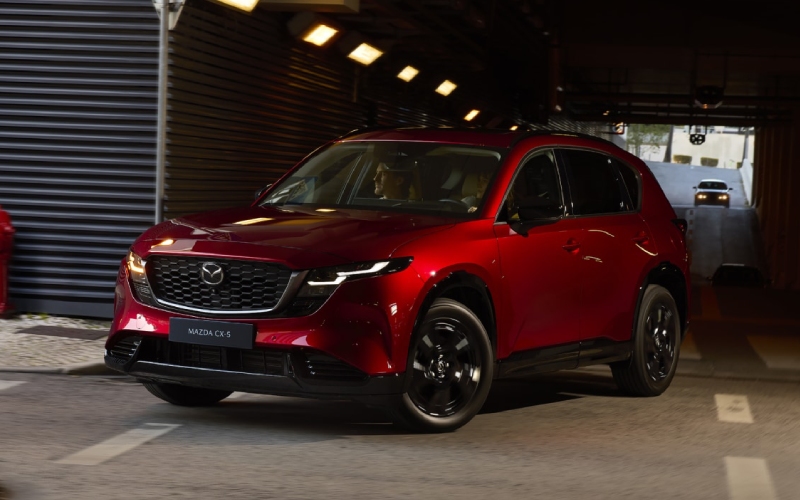
Biggers Mazda – Which SUV’s infotainment feels more intuitive for Schaumburg, IL drivers — 2026 Mazda CX-5 or 2026 Toyota RAV4?
Short answer up front
If your top question is “Which infotainment system is easier to live with every day?” the nod goes to the all-new Mazda setup in the 2026 CX-5. It pairs an available 15.6-inch integrated touchscreen with Google built-in for native Google Maps, access to the Google Play app ecosystem, and natural-voice assistance—plus an interface that looks and behaves like the smart devices you already use. Toyota’s all-new 2026 RAV4 counters with a standard 12.3-inch digital gauge cluster and an available 12.9-inch Toyota Audio Multimedia touchscreen that’s crisp, fast, and feature-rich with wireless smartphone mirroring and connected services. Both are modern; the Mazda’s native Google environment simply shortens the learning curve and reduces the “tap count” for common tasks.
Below, we break down how each system handles the everyday stuff—navigation, media, voice commands, updates, and the way the screen and controls fit into your driving routine—so you can pick the experience that matches your habits.
Screen size, layout, and responsiveness
Mazda’s available 15.6-inch display is the brand’s largest ever and uses a clean, edge-to-edge design that keeps high-frequency actions close to your natural reach zones. The home screen is customizable, with tiles you can arrange based on what you use most—say, Google Maps, podcasts, and vehicle settings—so your routine flows with fewer taps. Toyota’s 12.9-inch screen in the RAV4 is also sharp and responsive, and its logical menu structure is easy to learn. In daily use, the Mazda’s extra screen real estate and flexible tile layout make split-view navigation-and-media combinations feel less cramped and more glanceable, which helps when traffic gets dense on the Jane Addams.
Another small detail with big value: Mazda’s system was designed from the start around native Google apps, so map and search elements look exactly like they do on your phone. That familiarity can save time when you’re parking, previewing a storefront, or planning a stop at a new trailhead.
Navigation and voice assistance
With Google built-in, the CX-5 taps Google Maps directly, showing real-time traffic, updated points of interest, and saved places once you sign in. Try “Hey Google, route me to the nearest pharmacy with a drive-thru” and you’ll get precise results with the expected Google filters. Toyota’s system responds well to natural phrases too—its voice recognition has improved steadily—and it supports robust cloud-based features through subscriptions. Both are capable; Mazda’s native approach avoids the juggling that sometimes comes with switching between built-in nav and smartphone mirroring.
One more advantage for Mazda’s setup is continuity: if you use Google Maps on your phone or desktop, your favorites and previous searches are already there in the car. That reduces friction the first few weeks of ownership, when most drivers are still building new muscle memory.
Media, apps, and updates
Both vehicles support streaming and connected audio, but the route to get there differs. The CX-5’s Google built-in environment lets you download compatible apps via Google Play, launching directly from the vehicle without connecting a phone. That is especially handy for news, music, and some productivity tools you regularly use. The RAV4’s Toyota Audio Multimedia emphasizes seamless phone integration and cloud connectivity; it shines when you prefer to run everything through your smartphone, and its wireless Apple CarPlay and Android Auto support works smoothly.
Over time, software matters as much as hardware. Mazda’s approach leverages Google’s steady cadence of updates—so maps, search, and supported apps evolve without a lot of manual intervention. Toyota likewise pushes improvements and added features through its connected services. In practical terms, both keep getting better; Mazda’s native Google link just trims the wait between new features showing up on your phone and appearing on the vehicle screen.
So which setup feels more intuitive during a busy week of commuting, school drop-offs, and errands? If your life already runs through Google services, the CX-5’s in-car experience will feel like second nature on day one. If you prefer a phone-first flow with solid wireless mirroring, RAV4’s system is quick to learn and pleasantly consistent.
Key differences at a glance
- Native ecosystem: 2026 CX-5 uses Google built-in for Maps, voice, and app access; RAV4 focuses on Toyota Audio Multimedia with robust phone mirroring.
- Screen approach: CX-5 offers an available 15.6-inch display with customizable tiles; RAV4 tops out at 12.9 inches with a clean, fast interface.
- Voice interaction: CX-5 offers natural-voice Google assistance; RAV4 supports natural-voice commands within Toyota’s system and connected services.
- App strategy: CX-5 can download compatible in-vehicle apps via Google Play; RAV4 emphasizes wireless Apple CarPlay/Android Auto for app access.
- Learning curve: CX-5 feels instantly familiar to Google users; RAV4 is straightforward if you run everything through your phone.
Of course, infotainment is only part of the story. The Mazda focuses on a quiet, composed ride and standard i-Activ AWD across the lineup; Toyota doubles down on electrified powertrains and adds conveniences like Drive Recorder and available Advanced Park. If you routinely face winter weather, standard AWD plus Mazda’s nuanced steering and body control make the CX-5 feel especially settled without extra setup. If you want electrified torque and prefer a phone-centered cockpit, RAV4’s approach will resonate.
Our advice is simple: bring your daily routine with you to a test drive—your favorite playlists, your go-to voice prompts, a couple of tricky addresses—and use them in both vehicles. That 20-minute exercise reveals which interface matches your habits and which one you’ll want to live with for years.
Frequently Asked Questions:
Does the 2026 CX-5 support Google Maps without connecting a phone?
Yes. With Google built-in, the CX-5 runs Google Maps natively, including real-time traffic and saved places once you sign in.
Can I still use Apple CarPlay or Android Auto in either SUV?
Yes. Both vehicles support smartphone mirroring. RAV4 emphasizes wireless Apple CarPlay and Android Auto; the CX-5 focuses on native Google with support for phone-based mirroring as appropriate for your device.
How do voice commands differ?
The CX-5 uses Google’s natural-voice assistant for tasks like directions, calls, and media. RAV4 includes natural-voice commands within Toyota’s system and connected services for similar actions.
Which feels faster when switching between apps?
Both are responsive. The CX-5’s larger 15.6-inch display and customizable tiles can reduce taps for side-by-side navigation and media. RAV4’s menus are clean and quick, especially if you prefer running everything through your phone.
If you’re ready to try both systems back to back, Biggers Mazda can set up an infotainment-focused drive loop and show you how voice, navigation, and media behave in real time. We are proudly serving South Elgin, Schaumburg, and Palatine with a knowledgeable team that understands how tech fits real Midwest driving. One visit is often all it takes to recognize which system aligns with your daily routines and future plans.
0 comment(s) so far on Which SUV’s infotainment feels more intuitive for Schaumburg, IL drivers — 2026 Mazda CX-5 or 2026 Toyota RAV4?