



How Google built-in on the 2026 Mazda CX-5 Simplifies Everyday Driving around Schaumburg, IL
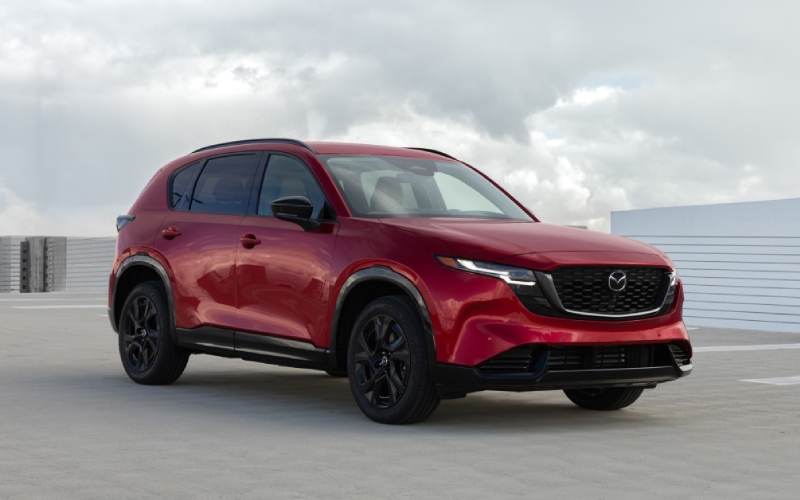
Biggers Mazda – How Google built-in on the 2026 Mazda CX-5 Simplifies Everyday Driving around Schaumburg, IL
Google built-in on the 2026 Mazda CX-5 turns a beautifully crafted crossover into a daily assistant that meets you where you are—on the move. Anchored by an available 15.6-inch display, the system brings the familiar tools you use on your phone right into your dashboard, but optimized for the road. From real-time routing with Google Maps to a curated Google Play Store for in-vehicle apps, it feels natural, fast, and focused. And with Google Gemini on the horizon, you can expect even more conversational voice support that understands context, so you can ask complex questions and follow up without memorizing commands.
For Schaumburg drivers, that matters in real ways. Maybe you are hopping between Woodfield-area errands or making an early commute on I-290—quick access to saved places, live traffic, and turn-by-turn prompts keeps your day moving and your hands on the wheel. Google built-in also syncs smoothly when you sign into your Google Account, helping personalize your cockpit with your favorites already queued up. It is the kind of tech that fades into the background because it just works, and that is exactly what you want in a vehicle that carries you through a busy week.
Let’s talk about the display itself. Mazda’s new interface leverages the 15.6-inch canvas to give you large, glanceable touch targets and a home screen you can customize for the things you use most—navigation tiles, media playback, or a quick settings tray. The result is less hunting through menus and more confidence when you need to make a selection in a split second. Combined with the calm, uncluttered interior and thoughtful materials, this system makes screen time feel like part of a refined driving experience instead of a distraction.
Voice control is another place where Google built-in shines. Stuck in traffic near Meacham Road and remember you promised to pick up something on the way home? Say it, and your assistant adds a stop, finds the nearest shop, and adjusts your route. Need to call a colleague? Just ask. When Google Gemini arrives to compatible vehicles, it will get even better at understanding nuances and follow-up questions, reinforcing Mazda’s human-centric approach to tech—simple, intuitive, and useful.
Pair this software with the poise you expect from Mazda—the recalibrated SkyActiv-G 2.5-liter engine, standard i-Activ AWD, and tuning that makes the CX-5 feel settled over broken pavement—and you have a crossover that is more than the sum of its parts. The technology does not overwhelm the drive; it supports it. On a rainy morning or a late-night airport run, it is reassuring to have navigation that stays current, media that is easy to control, and a system that respects your attention as a driver.
Another everyday win: updates. Because the platform supports adding features via future updates, your system can gain polish and capability over time. It is a quiet benefit that pays off long after you drive away, especially if you value tech that evolves. And when you consider the new CX-5’s increased cabin space, larger door openings, and expanded cargo area, you are looking at a crossover that blends practical upgrades with meaningful digital convenience.
Want some ideas to make the most of Google built-in from day one? Here are simple, high-impact tips.
- Set your home screen: Pin your most-used apps and widgets so common actions are one tap away.
- Sign in for personalization: Access saved places, recent searches, and tailored app recommendations.
- Use voice first: Prioritize voice commands for navigation changes and calls to minimize distraction.
- Preload for errands: Add multiple stops in Google Maps before leaving for a smoother route.
- Curate your Play Store: Choose audio, news, and productivity apps that add value without clutter.
Parents will appreciate how easily this system adapts to family routines. Queue up playlists, set the next stop, and get back to the conversation—without fumbling through your phone. Professionals benefit, too: reliable maps and natural-voice dialing turn your cabin into a well-mannered workspace between appointments. And when the weekend arrives, that huge display and smooth UI make finding a trailhead or planning a dinner in the suburbs something you do quickly and without fuss.
If you are comparing vehicles, remember that it is not just the size of the screen but the thoughtfulness of the software and hardware together. Mazda’s execution brings a premium, quiet interface that complements the driver-first dynamics the brand is known for. You feel it when you reduce the little frictions—less tapping, less second-guessing, more flow. It is exactly the kind of polish that makes a difference over thousands of miles.
Ready to see how it all comes together? Biggers Mazda offers hands-on walkthroughs so you can try the display, test voice control, and explore how Google built-in supports your daily drive. Our team is serving South Elgin, Schaumburg, and Palatine with a simple goal—help you decide with clarity and confidence, based on how you actually drive.
Frequently Asked Questions:
Do I need to connect my phone to use Google built-in?
No. Google built-in runs natively on the vehicle’s system. You can sign into your Google Account to personalize features, but your phone does not need to be connected for core functions like Maps.
Can I download any app from Google Play?
The Google Play Store in the vehicle offers a curated selection designed for in-car use. You will find top options for music, news, and select productivity tools that are optimized for driving.
How does voice control help reduce distraction?
Voice lets you handle navigation changes, calls, and searches without taking your hands off the wheel. With natural language support, you can ask follow-up questions without memorizing commands.
What happens if I lose signal?
Maps can cache routes, and the system continues to function. For full real-time traffic and search, an internet connection is recommended, but basic navigation still works wherever possible.
Will the system get updates over time?
Yes. The platform supports future updates and added features, helping your infotainment stay current and capable well after purchase.
0 comment(s) so far on How Google built-in on the 2026 Mazda CX-5 Simplifies Everyday Driving around Schaumburg, IL